Removing tags in XactInsights
 Updated
by
Mara K
Updated
by
Mara K
Tags are labels used to organize and locate content within Answers and Liveboards. In XactInsights, tags are created by Verisk to classify and identify content in these areas. Users can apply filters on the Tags column in Answers and Liveboards to quickly retrieve items associated with a specific tag.
Remove a tag from an Answer or Liveboard
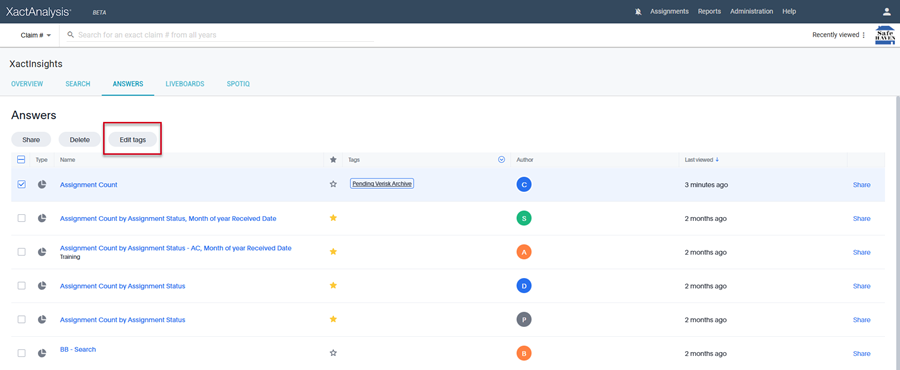
- Select the checkbox next to the Answer or Liveboard.
Note: You can only remove a tag from an Answer or Liveboard that you created.
- Select Edit tags, which appears when the checkbox is selected.
- In the Edit Tags dialog box, select the X next to the tag you want to remove.
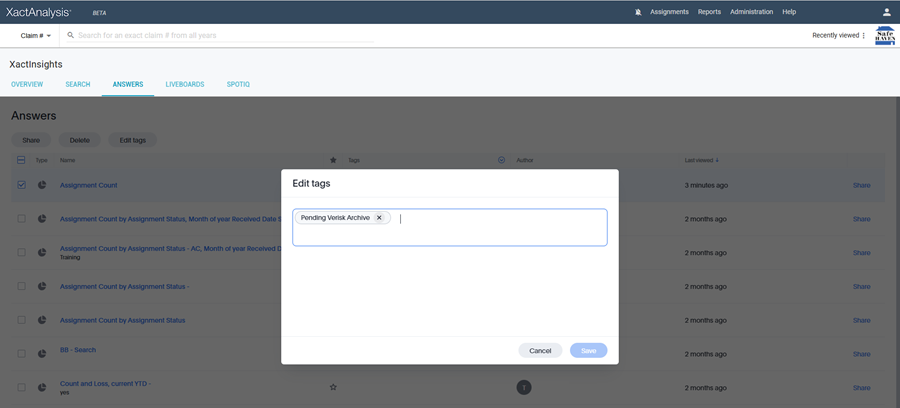
- Select Save to apply the changes.